Prepare the roll.
Bring your printed DTF film into the cutting workflow. Match the roll width and material to the system.

SENTINEL / AUTOMATED DTF CUTTING
Vision-guided laser cutting with dual bridges and two cutting heads. A 36-inch bed for rolls up to 36 inches wide. Bring the finishing stage into your production workflow.
Explore the machine ↓For DTF rolls up to 36 inches wide
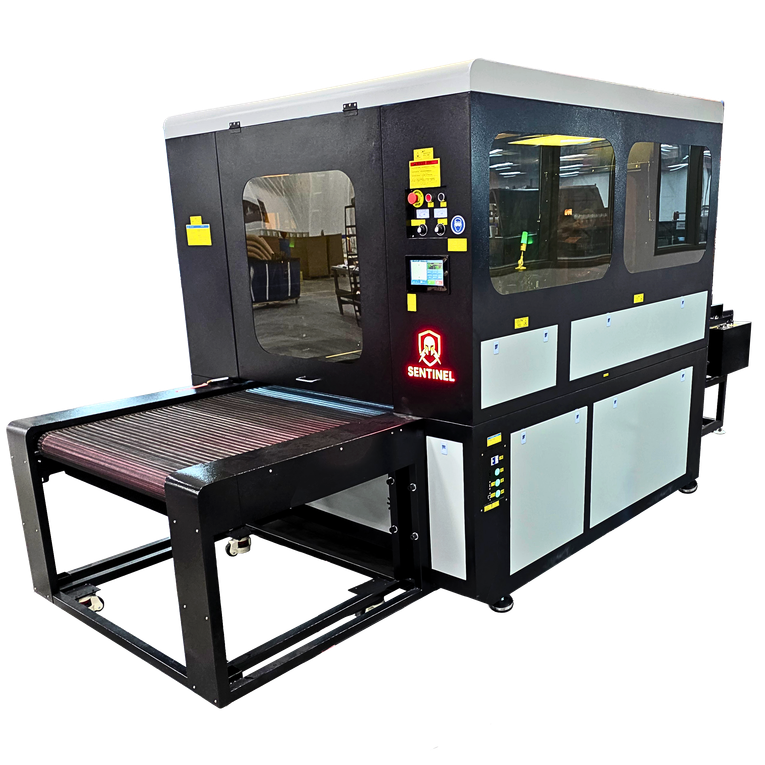
SENTINEL / VISION + LASER + CONVEYOR
THE PLATFORM BEHIND THE WORKFLOW.
Turn printed film into a repeatable finishing process. Start with the hardware, then explore the workflow around it.
Take the machine tour ↓Confirm material compatibility, package contents, and site requirements for your selected configuration.
FROM PRINTED ARTWORK TO FINISHED TRANSFER.
Put vision-guided cutting into motion. Choose a sample job. One scan recognizes every piece, then the two bridges work inward from opposite ends of the sheet without crossing.
YOUR SAMPLE JOB
Run the demo to scan the entire sheet at once, then watch two cutting heads work inward from opposite ends of the sheet.
Illustrative two-head workflow using SuperGamut artwork. Bridge motion and simultaneous shared cuts are simplified; actual scheduling depends on the job. Animation speed, paths, and spacing do not represent measured machine performance.
YOUR FRONT-ROW LOOK AT SENTINEL.
Explore the system from camera recognition to cutting and collection. Choose a step to see how it fits.
SYSTEM OVERVIEW
Bring camera recognition, dual-bridge laser cutting, and conveyor handling into one DTF finishing workflow. Follow the system from the printed roll to the transfers you collect.
PRINT. CUT. KEEP MOVING.
Bring the same attention to cutting that you bring to printing. Build a process around the work you actually produce.
Bring your printed DTF film into the cutting workflow. Match the roll width and material to the system.
The overhead camera reads the film. Sentinel software and Gangify integration support visual cut-line generation. Two cutting heads on dual bridges can cut separate transfers simultaneously.
Use the exit conveyor to collect transfers for pressing or packing. Explore perf-cut mode for roll delivery.
BUILT AROUND YOUR SHOP.
Sentinel accepts film up to 36 inches wide, making it a fit for Kraken production and other compatible DTF systems. Review the complete print-to-cut workflow with your own jobs.
THE SYSTEM IN MOTION.
Watch the Sentinel series overview, then talk through the setup for your shop.
Series footage. Equipment shown may differ from your selected configuration.
MORE THAN A MACHINE.
Equipment, software, and hands-on setup form one finishing workflow. SuperGamut helps connect it to the way your shop works.
Your written quote confirms package contents, installation scope, and the selected configuration.
PLAN YOUR PRODUCTION SPACE.
A clear view of the feeder, cutting system, power connections, and the exhaust outlet—before you plan your installation.
Includes the feeder arrangement shown.
Additional work areas and service access to be confirmed.

Coordinate the exhaust arrangement and final electrical connections with the team before installation.
The 12′8⁵⁄₁₆″ × 5′7⅞″ layout shows the feeder and cutting system. Add space for loading rolls, collecting transfers, operation, maintenance, and your delivery route. Bring a room sketch so we can review the complete installation together.
FROM SCISSORS TO LASER.
Start with how many transfers you sell each working day. We use 20 working days to calculate your monthly estimate. Compare the cutting labor for scissors and Sentinel laser cutting.
Use an average working day.
Based on 8 working hours/day and 160 hours/month (20 working days).
900 per day × 20 working days = 18,000 transfers / month.
Include wages and employer costs.
Comparison uses these cutting rates for the same monthly volume.
80% less cutting time at these rates. Saved time can support other work; payroll savings depend on how you use it.
No email needed to calculate.
Consistent, repeatable boxes around every transfer.
Reduce the variation and mistakes that come with hand trimming.
Tighter, consistent cut margins help make more of your printed film.
Monthly transfers = transfers per working day × 20 working days (160 monthly hours ÷ 8 daily hours). Scissor cutting hours = monthly transfers ÷ 150. Laser cutting hours = monthly transfers ÷ 750. Cutting labor cost = hours × hourly labor cost. Monthly savings = scissor labor cost − laser labor cost; annual savings = monthly savings × 12.
The comparison assumes the same transfer volume and hourly labor cost for both methods. Rates are comparison assumptions; actual output depends on transfer size, layout, material, and workflow. This estimates cutting labor only, excluding loading, sorting, equipment purchase, and operating costs. It is not a net-profit or payback calculation.
Quality, defect reduction, and film utilization are additional benefits and are not assigned dollar savings in this estimate. Reclaimed time becomes payroll savings only when paid labor costs decrease.
LET’S GET PRACTICAL.
The standard Sentinel has a 36-inch cutting bed and handles film up to 36 inches wide. Confirm your material and final configuration with your quote.
The standard Sentinel uses dual bridges with two cutting heads, allowing more than one rectangular transfer to be cut at a time after the whole-sheet scan. Actual head scheduling and cutting time depend on the job.
The camera-based workflow recognizes the printed transfers without separate DXF or CAD overlays. Gangify integration provides visual cut-line generation. We’ll review your artwork and production workflow during setup.
The Sentinel series is designed to work with DTF production systems beyond SuperGamut printers. Match your film width and material to the system, then validate the workflow with your own transfers.
Cutting time varies with transfer size, spacing, layout, material, and cutting mode. Bring a representative production job so we can evaluate the full workflow, including loading, collection, and sorting.
The series supports a perf-cut mode for roll delivery with pre-separated sections. Review your material, cut pattern, and delivery format with the team to confirm the setup.
The series package includes an auto-feeder, exit conveyor, overhead HD camera, control PC, Sentinel software, Gangify integration, integrated exhaust, and onsite installation and training. Your written quote confirms the final configuration and scope.
We’ll review the machine dimensions, delivery route, loading and collection areas, electrical connections, and extraction arrangement for your configuration. Request the model-specific site requirements before finalizing your room layout.